
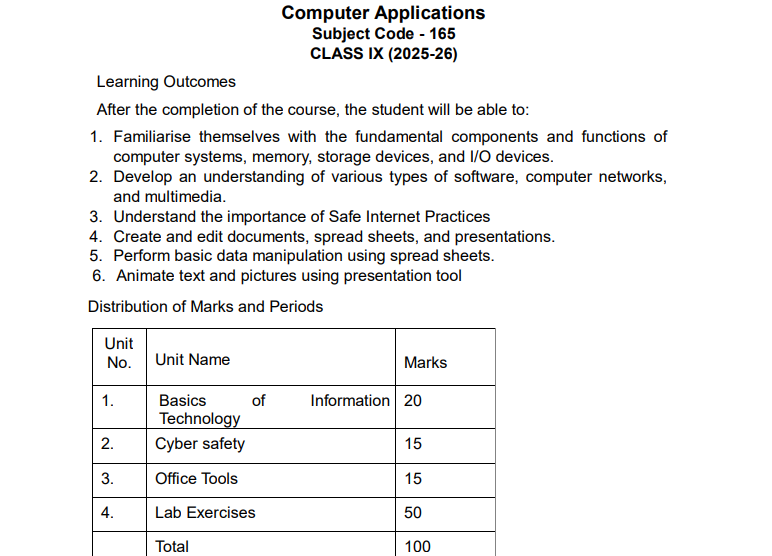
The CBSE Class 10 Computer Syllabus 2025-26 aims to provide students with essential knowledge in information technology, enabling them to develop computational skills and a solid foundation in digital literacy. The curriculum covers important topics such as networking, web applications, programming in Python, and cybersecurity, encouraging practical application through projects and hands-on learning. By fostering problem-solving abilities and critical thinking, the syllabus prepares students for advanced studies and real-world applications in the digital age. It equips learners with the technical skills necessary to thrive in an increasingly digital world, both academically and professionally.
CBSE Class 10 Computer Syllabus 2025-26
Students can obtain the PDF of the updated syllabus for CBSE Class 10 Computer Applications from this page or the organization’s official website. Check out this post and download the PDF to learn the most recent CBSE Class 10 Computer course structure, syllabus, and practical mark distribution.
CBSE Class 10 Computer Applications Course Structure
The first thing to understand about a subject is the course format. A course structure effectively assists the learner and tutor in completing the Study material on time and at the appropriate pace. It also displays the weightage of each unit, which students can use to prepare for their exams. View the CBSE Class 10 Computer Applications course structure here.
|
Unit No.
|
Unit Name
|
Marks
|
Periods
|
|
|
Theory
|
Practical
|
|||
|
1.
|
Networking
|
15
|
17
|
05
|
|
2.
|
HTML
|
25
|
30
|
50
|
|
3.
|
Cyber ethics
|
10
|
08
|
10
|
|
4.
|
Practicals
|
50
|
–
|
–
|
|
Total
|
100
|
55
|
65
|
|
CBSE Class 10 Computer Syllabus 2025-26 in Details
Students must complete three units of the CBSE 10th Computer Syllabus in order to be ready for the 2026 board test. The students will learn about HTML, networking, and cyber ethics in these three lessons. The lab practicals will cover the remaining tasks. For more information on the subjects covered in each unit, check out this page.
|
Unit 1: Networking
|
|
• Internet: World Wide Web, web servers, web clients, web sites, web pages, web browsers, blogs, news groups, HTML, web address, e-mail address, downloading and uploading files from a remote site.
• Internet protocols: TCP/IP, SMTP, POP3, HTTP, HTTPS. Remote login and file transfer protocols: SSH, SFTP, FTP, SCP, TELNET, SMTP, TCP/IP.
• Services available on the internet: information retrieval, locating sites using search engines and finding people on the net;
• Web services: chat, email, video conferencing, e-Learning, e-Banking, eShopping, e-Reservation, e-Governance, e-Groups, social networking.
• Mobile technologies: SMS, MMS, 3G, 4G.
|
|
Unit 2: HTML
|
|
• Introduction to web page designing using HTML: create and save an HTML document, access a web page using a web browser.
• HTML tags: html, head, title, body, (attributes: text, background, bgcolor, link, vlink, alink), br (break), hr(horizontal rule), inserting comments, h1..h6 (heading), p (paragraph), b (bold), i (italics), u (underline), ul (unordered list), ol (ordered list), and li (list item). Description lists: dl, dt and dd. Attributes of ol (start, type), ul (type).
• Font tags (attributes: face, size, color).
• Insert images: img (attributes: src, width, height, alt), sup (super script), sub (subscript).
• HTML Forms: Textbox, radio buttons, checkbox, password, list, combobox.
• Embed audio and video in a HTML page.
• Create a table using the tags: table, tr, th, td, rowspan, colspan
• Links: significance of linking, anchor element (attributes: href, mailto), targets.
• Cascading style sheets: colour, background-colour, border-style, margin, height, width, outline, font (family, style, size), align, float.
|
|
Unit 3: Cyber ethics
|
|
• Netiquettes.
• Software licenses and the open source software movement.
• Intellectual property rights, plagiarism and digital property rights.
• Freedom of information and the digital divide.
• E-commerce: Privacy, fraud, secure data transmission.
|
|
4. Lab Exercises
|
|
• Create static web pages.
• Use style sheets to enforce a format in an HTML page (CSS).
• Embed pictures, audio and videos in an HTML page.
• Add tables and frames in an HTML page.
• Decorate web pages using graphical elements.
• Create a website using several web pages. Students may use any open source or proprietary tool.
• Work with HTML forms: text box, radio buttons, checkbox, password, list, combo box.
• Write a blog using HTML pages discussing viruses, malware, spam and antiviruses
• Create a web page discussing plagiarism. List some reported cases of plagiarism and the consequent punishment meted out. Explain the nature of the punishment in different countries as per their IP laws.
|
The practicals are an important part of CBSE Class 10 Computer Science. Students must be aware of the breakup of marks for each section. Check the breakdown of marks for the practicals:
|
S. No.
|
Unit Name
|
Marks
|
|
1.
|
Lab Test (20 marks)
|
|
|
HTML (design one web page based on a diagram)
|
20
|
|
|
2.
|
Report File + viva (20 marks)
|
|
|
Report file: At least 10 HTML pages
|
15
|
|
|
Viva voce (based on the report file)
|
5
|
|
|
3.
|
Project (that uses most of the concepts that have been learnt) (10 marks)
|
|
|
Total (50 marks)
|
||
CBSE Class 10 Computer Syllabus 2025-26 PDF Download
To download the CBSE Class 10 Computer Applications syllabus for the academic year 2025-26 in PDF format, follow these steps:
From the Official CBSE Website:
- Visit the CBSE website:
- Go to the official CBSE website: cbse.gov.in.
- Access the Curriculum Section:
- On the homepage, locate and click on the “Academic Website” tab.
- Look for the “Curriculum” section, which might be under the “Academic” dropdown menu.
- Select Class 10:
- Choose the “Secondary Curriculum” or “Class IX-X” option.
- Find the Computer Applications Syllabus:
- Look for “Computer Applications” under the list of subjects.
- Download the PDF:
- Once you find the subject, click on the download link for the syllabus for 2024-25 in PDF format.
From Official Syllabus4u Website:
Download Link for CBSE Class 10 Computer Syllabus 2025-26 is given below. Click on the given link.
Computer_Applications_Class 9-10th_2025-26 PDF
Tips to cover Class 10 Computer Syllabus Easily
Covering the CBSE Class 10 Computer Applications / IT syllabus can be quite easy if you follow a smart and practical approach. Here are simple, exam-oriented tips to help you prepare efficiently.
Understand the Syllabus & Weightage First
Start by reading the official CBSE syllabus and marking high-weight chapters like:
-
Networking & Internet
-
HTML / Web Applications
-
Python basics (if applicable)
-
Employability Skills
Knowing what carries more marks helps you study smart, not hard.
Focus More on Practical Work
Computer is a skill-based subject, so:
-
Practice HTML tags, lists, tables, and forms
-
Write Python programs regularly
-
Learn output-based questions
Practicing on a computer makes concepts stick faster than theory.
Use NCERT & Lab Manual Properly
-
Read NCERT line by line (many questions come directly)
-
Practice lab manual questions, as practical exams are scoring
-
Revise definitions, syntax, and examples from NCERT
Learn Theory with Short Notes
Prepare one-page notes for:
-
Definitions
-
Key terms
-
Syntax rules
-
Differences (LAN vs WAN, Compiler vs Interpreter)
These are very helpful for quick revision before exams.
Practice Previous Year Questions & Sample Papers
-
Solve CBSE sample papers
-
Practice case-study & competency-based questions
-
Time yourself to improve speed and accuracy
This boosts confidence and exam performance.
Watch Concept-Based Video Tutorials
If a topic feels confusing:
-
Watch short YouTube concept videos
-
Pause and try examples yourself
-
Revise using visuals and diagrams
Visual learning makes technical topics much easier.
Revise Regularly & Avoid Last-Minute Cramming
-
Revise weekly
-
Practice programs repeatedly
-
Keep revising important syntax
Computer exams are high-scoring if you revise properly.
Pay Special Attention to Practical Exam Preparation
-
Practice programs asked in practicals
-
Learn Viva questions (definitions & uses)
-
Be confident while explaining logic
Final Tip
If you practice daily for 30–40 minutes, Computer Applications can become one of the easiest and highest scoring subjects in Class 10.
Class 10 Computer Syllabus 2025-26: FAQs
Question 1. What are the main topics covered in the Class 10 Computer Applications syllabus?
Answer: The CBSE Class 10 Computer Applications syllabus typically covers topics like:
-
- Internet Basics and Services
- HTML and Web Designing
- Cybersecurity
- Word Processing (Advanced features of Word)
- Spreadsheet tools (Advanced features of Excel)
Question 2. Is there any practical component in the Class 10 Computer Applications exam?
Answer: Yes, the Computer Applications subject has a practical component. Students are evaluated based on practical exams, which include creating web pages using HTML, working on spreadsheets, and handling word processing tasks.
Question 3. What are the weightage and marks distribution for the Computer Applications exam?
Answer: The Computer Applications theory exam is usually conducted for 50 marks, and the practical exam carries 50 marks, making a total of 100 marks.
Question 4. Are there any specific tools or software recommended for practice?
Answer: For practical work, students should be familiar with:
-
- Web browsers and basic HTML editors (e.g., Notepad or Notepad++)
- Spreadsheet software like Microsoft Excel or LibreOffice Calc
- Word processing software like Microsoft Word or LibreOffice Writer
Question 5. Is coding taught in the Class 10 Computer Applications syllabus?
Answer. Basic coding skills are introduced through HTML for web designing. However, there is no in-depth programming in languages like Python or Java in the Class 10 syllabus; the focus is more on internet basics, document creation, and web technologies.
Related Post:
About The Author

5 thoughts on “CBSE Class 10 Computer Syllabus 2025-26, PDF Download”