
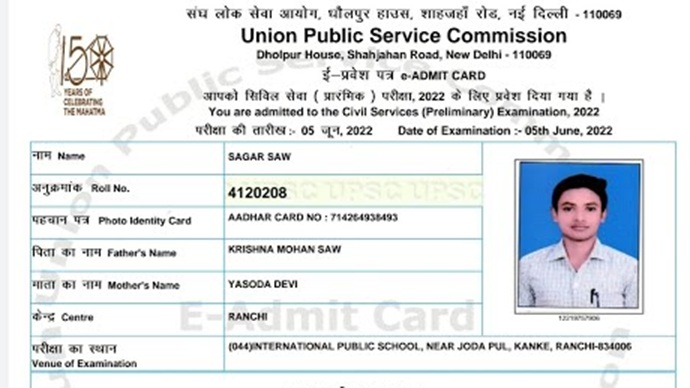
The Union Public Service Commission is expected to release the UPSC Prelims Admit Card 2026 very soon on its official website. Candidates who have successfully applied for the Civil Services Examination (CSE) 2026 will be able to download their admit card online.
This article covers everything you need to know, including release date, download steps, details mentioned, and important instructions.
UPSC Prelims Admit Card 2026 Release Date
The UPSC generally releases the admit card 2–3 weeks before the exam date.
- Expected Release Date: May 2026
- UPSC Prelims Exam Date 2026: Likely in June 2026
Candidates are advised to regularly check the official UPSC website to avoid missing any updates.
How to Download UPSC Prelims Admit Card 2026 PDF
Follow these simple steps to download your admit card:
Step-by-Step Process:
- Visit the official UPSC website: https://www.upsc.gov.in
- On the homepage, click on the “Admit Card” section
- Select “E-Admit Card for UPSC Civil Services Preliminary Examination 2026”
- Read the instructions carefully and click on “Yes.”
- Choose any one option:
- By Registration ID
- By Roll Number
- Enter your details:
- Registration ID / Roll Number
- Date of Birth
- Captcha Code
- Click on Submit
- Your admit card will appear on the screen
- Download the PDF and take a printout
Details Mentioned on UPSC Admit Card
After downloading, carefully verify the following details:
- Candidate’s Name
- Roll Number
- Registration ID
- Exam Date & Time
- Exam Centre Address
- Photograph & Signature
- Important Instructions
If you find any discrepancy, immediately contact UPSC authorities.
Important Instructions for Candidates
- Carry a printed copy of the admit card to the exam centre
- Bring a valid photo ID proof (Aadhaar, PAN, Voter ID, etc.)
- Reach the exam centre at least 1 hour before reporting time
- Electronic devices like mobile phones are strictly prohibited
- Follow all exam-day guidelines mentioned on the admit card
What If You Forget Registration ID?
If you don’t remember your Registration ID:
- Click on “Forgot RID” option on the login page
- Enter your name, father’s name, and date of birth
- Retrieve your registration details
Key Points to Remember
- Admit card will be available only in online mode
- No admit card will be sent by post
- Without admit card, entry to exam hall is not allowed
- Keep multiple printouts for safety
Conclusion
The UPSC Prelims Admit Card 2026 is a crucial document for appearing in the exam. Candidates should download it as soon as it is released and verify all details carefully. Following the correct steps and instructions will ensure a smooth exam experience.
CSAT Admit card 2026: FAQs
1. When will the UPSC Prelims Admit Card 2026 be released?
The UPSC Prelims Admit Card 2026 is expected to be released in May 2026, usually 2–3 weeks before the exam date.
2. Where can I download the UPSC Prelims Admit Card 2026?
You can download it from the official websites:
- upsc.gov.in
- upsconline.nic.in
3. What are the steps to download UPSC Admit Card 2026 PDF?
Follow these simple steps:
- Visit the official UPSC website
- Click on “Admit Cards” section
- Select “e-Admit Card: Civil Services (Preliminary) Examination 2026”
- Choose login option (Registration ID or Roll Number)
- Enter DOB and captcha
- Download and print the admit card PDF
4. What details are required to download the admit card?
You need:
- Registration ID / Roll Number
- Date of Birth
5. Can I download UPSC Admit Card without Registration ID?
Yes, you can use your Roll Number.
If you forget your Registration ID, you can retrieve it from the UPSC portal.
6. Will UPSC send the admit card by post?
No, UPSC does not send admit cards offline.
You must download it online only.
7. What details are mentioned on the UPSC Admit Card?
The admit card contains:
- Candidate’s name
- Roll number
- Exam date & timing
- Exam centre address
- Instructions for exam day
8. Is it mandatory to carry a printed admit card?
Yes, a printed copy is compulsory along with a valid photo ID for entry to the exam centre.
9. What should I do if there is an error in the admit card?
Immediately contact UPSC helpline or support through the official website before the exam date.
10. Can I change my exam centre after admit card release?
No, UPSC generally does not allow changes in exam centre after the admit card is issued.
11. What documents should be carried with the admit card?
- Printed admit card
- Valid Photo ID (Aadhaar, PAN, Voter ID, etc.)
- Passport-size photographs (if required)
12. What if I forget to bring the admit card to the exam centre?
You will not be allowed to enter the exam hall without the admit card.
13. Is the admit card required after the exam?
Yes, keep it safe—it may be needed for:
- Mains exam
- Interview stage
- Document verification
14. How many days before the exam is admit card released?
Usually 10–15 days before the exam, based on previous trends.
About The Author
